 KwikID Documentation
Multi-Party Video Calls
Multi-Party Video Call Configuration and Management in Video KYC/ VPD journey
Multi-Party Video Calls
Overview
Multi-Party Video Calls enable a single additional passive listener to join a video verification session (KYC, VPD, or other verification processes) while maintaining clear roles and permissions. This feature is designed for scenarios where one additional stakeholder needs to observe the verification process without disrupting the primary interaction between the agent and user.
Architecture
Primary Participants
- Primary Agent: The main agent conducting the verification process (KYC, VPD, etc.)
- Primary User: The customer undergoing the verification process
Passive Participant
- Passive Participant: A single additional agent, supervisor, stakeholder, or observer who can view the session with read-only access to camera feeds and audio. The system enforces a maximum of one passive participant per session.
Session Flow & Multi-Party Invitation Process
Step 1: Session Initialization
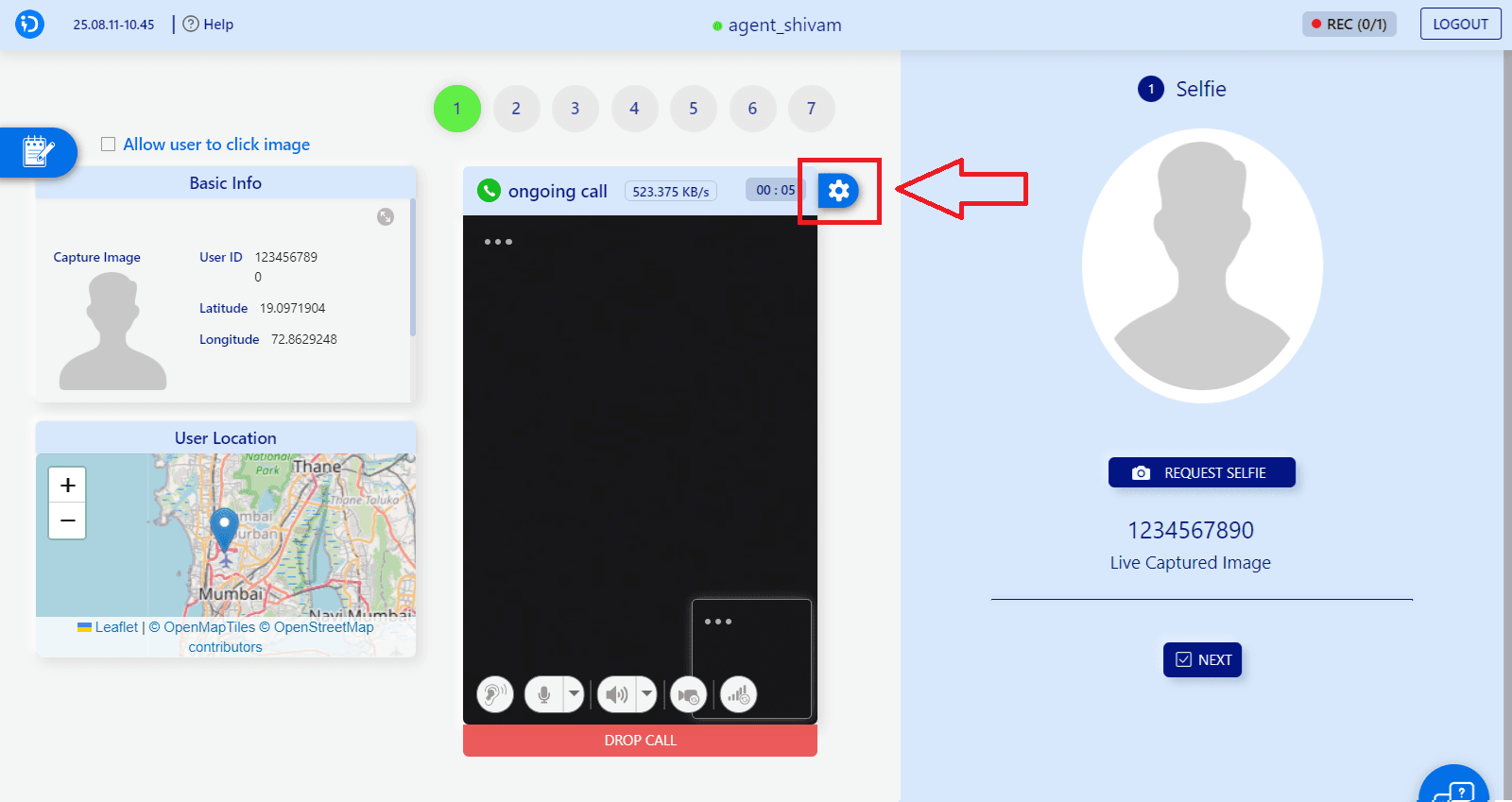
The primary agent initiates the multi-party session with the primary user. This shows the standard VideoFlow interface with the primary agent (agent_shivam) and primary user connected, ready to invite a single passive participant for verification processes like KYC, VPD, or other identity verification scenarios.
Step 2: Participant Invitation
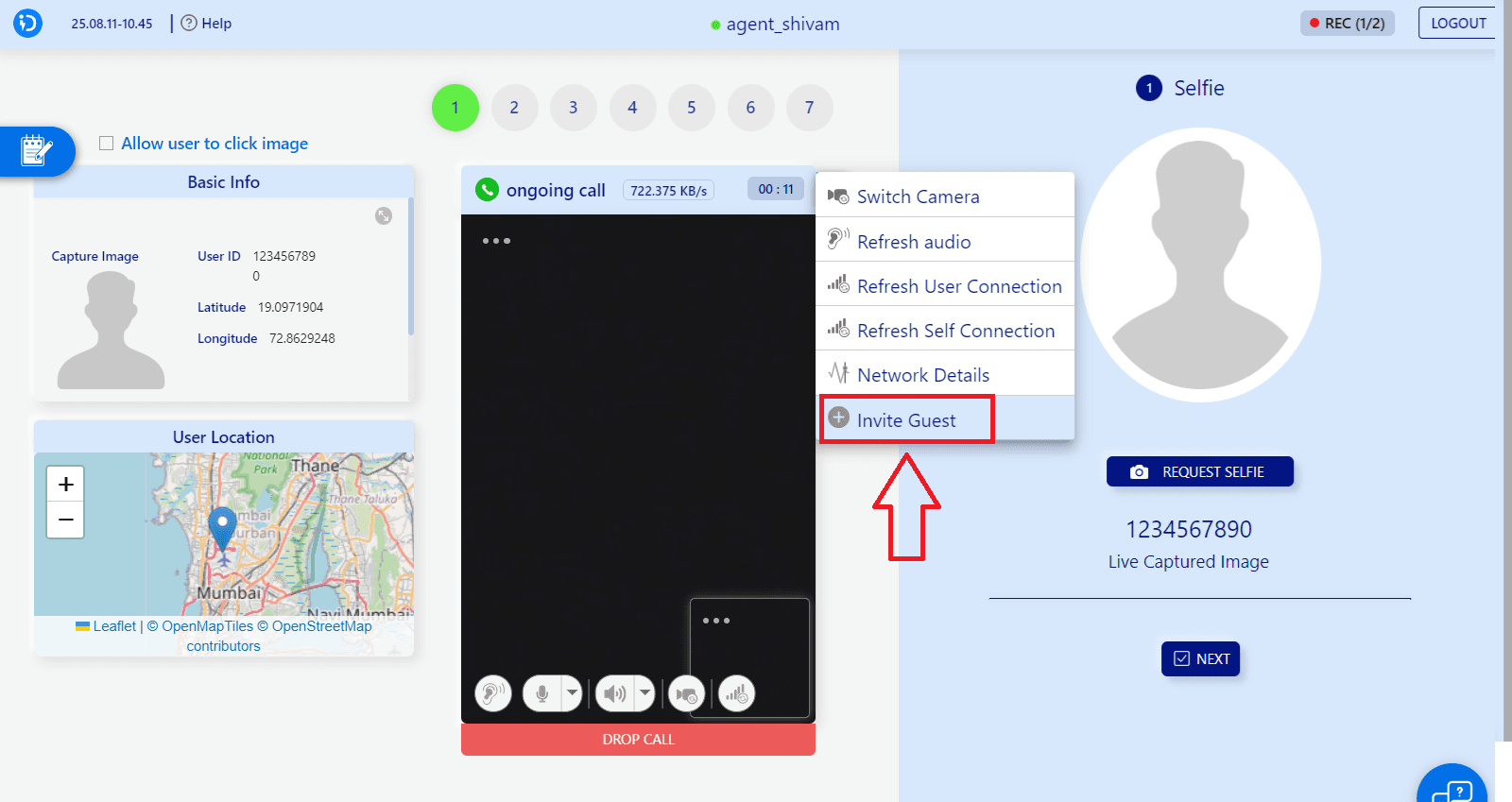
Use the "Invite Guest" feature to add a passive participant:
- Click the gear icon (⚙️) in the call controls
- Select "Invite Guest" from the context menu
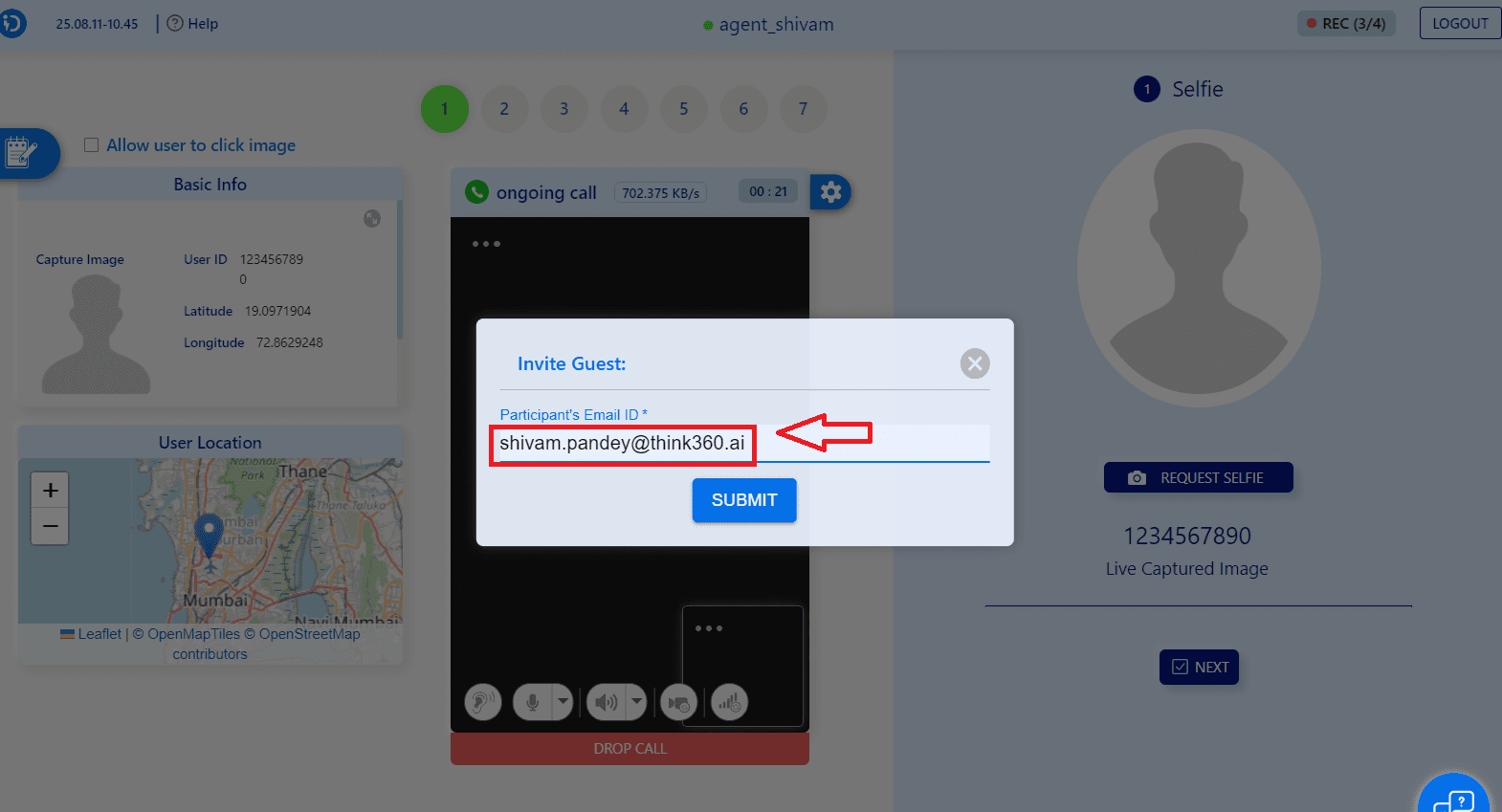
- Enter participant's email ID (e.g., "shivam.pandey@think360.ai")
- Click "SUBMIT" to send the invitation link
- The invited participant joins as a passive listener
Note: The "Invite Guest" functionality is accessible through the settings menu (gear icon) highlighted in the interface. The gear icon appears next to the call duration and provides access to call management options including the multi-party invitation system. Once one passive participant has joined, the system prevents sending additional guest invitations for that session.
Step 3: Multi-Party Session
Participant Roles:
- Primary Agent & User: Full interaction capabilities (camera, microphone, document/information sharing)
- Passive Participant (single listener): View-only access
What the Passive Participant Can See:
- Live camera feeds from both primary agent and primary user
- Real-time audio from the primary conversation
What the Passive Participant Cannot Do:
- Interrupt or speak during the session
- Control camera or microphone settings
- Modify session parameters
- Access sensitive user information beyond what's shared
- Interfere with the primary verification process
Use Cases
1. Supervisor Oversight
- Senior agents can monitor junior agent performance
- Quality assurance teams can observe verification processes
- Compliance officers can ensure regulatory adherence
- Managers can oversee customer interactions and service quality
2. Training and Mentoring
- New agents can learn by observing experienced colleagues
- Real-time guidance during complex verification scenarios
- Best practices demonstration
- Skill development through observation of various verification types
3. Multi-Stakeholder Verification
- Multiple departments can participate in high-value verifications
- Legal teams can observe document collection and verification
- Risk management teams can assess customer profiles and interactions
- Compliance teams can monitor adherence to policies and procedures
Technical Implementation
WebRTC Integration
- Peer-to-peer connections for primary participants
- Broadcast-style streaming for the single passive participant
- Optimized bandwidth management for a single additional listener
Security Features
- Encrypted video streams
- Role-based access tokens
- Session authentication for all participants
Best Practices
For Primary Agents
- Clear Communication: Inform all participants about the session purpose and verification type
- Professional Conduct: Maintain professional behavior as you're being observed
- Efficient Process: Streamline verification steps for better observer experience
- Adaptability: Handle different verification scenarios (KYC, VPD, etc.) professionally
For Passive Participants
- Respect Privacy: Maintain confidentiality of observed sessions
- No Interference: Avoid disrupting the primary verification process
- Take Notes: Document observations for later review
For Session Management
- Pre-session Briefing: Explain roles, expectations, and verification type to all participants
- Technical Check: Ensure all participants have stable connections
- Verification Type Setup: Configure session parameters based on verification type (KYC, VPD, etc.)
Troubleshooting
Common Issues
Participant Connection Problems
- Check internet connectivity
- Verify browser compatibility
- Ensure proper invitation link usage
Audio/Video Quality
- Adjust bandwidth settings
- Check device permissions
- Optimize camera and microphone settings
Session Stability
- Monitor participant count limits
- Check server capacity
- Verify network infrastructure
For additional help or troubleshooting, contact our support team or refer to the API documentation.