 KwikID Documentation
Ask
Natural-language search over authorized documents with pluggable AI providers
Ask
The Ask module provides natural-language search over documents the signed-in user is authorized to access. Answers cite DMS IDs from governed metadata using a pluggable external LLM provider.
Overview
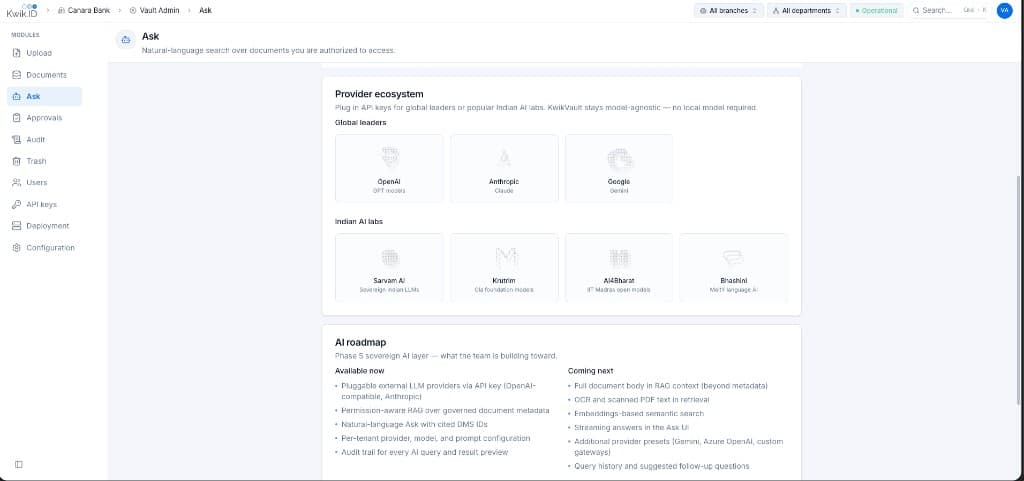
Ask is the sovereign AI layer. Kwik Vault stays model-agnostic: plug in API keys for approved global or regional LLM providers.
Key Features
- Permission-aware RAG: Retrieval-Augmented Generation over governed document metadata; results respect department and tenant boundaries.
- Cited sources: Every answer lists source documents with DMS ID, Business Key, category, and file name.
- Pluggable providers: Configure approved global and regional LLM providers from the Configuration AI tab.
- Per-tenant configuration: Provider, model, and prompt settings managed in Configuration AI tab.
- Audit trail: Every AI query and result preview is logged for compliance.
Provider Configuration
LLM providers are configured per tenant in the Configuration AI tab. Supported providers include global and regional options approved by your institution.
AI Capabilities
Available now
- Pluggable external LLM providers via API key
- Permission-aware retrieval over governed document metadata
- Natural-language Ask with cited DMS IDs
- Per-tenant provider, model, and prompt configuration
- Audit trail for every AI query and result preview
Coming next
- Full document body in retrieval context (beyond metadata)
- OCR and scanned PDF text in retrieval
- Embeddings-based semantic search
- Streaming answers in the Ask UI
- Additional provider presets and custom gateways
- Query history and suggested follow-up questions
Implementation
Step 1: Configure AI provider
- Open Configuration and select the AI tab.
- Add an API key for your chosen provider.
- Select model and customize the system prompt if needed.
- Save changes.
Step 2: Run a query
- Open Ask from the sidebar.
- Wait for the AI status check to confirm the provider is ready.
- Enter a natural-language question (e.g. "Show KYC documents for customer CIF 12345").
- Review the answer and cited source documents.
- Click a citation to navigate to the document in Documents.
Benefits
- No SQL training required: Relationship managers query documents in plain language.
- Sovereign choice: Institution selects approved models without platform lock-in.
- Governed discovery: AI never surfaces documents outside the user's authorization scope.
Next Steps
- Configuration: AI provider and prompt settings
- Audit: review AI query audit entries
- Documents: browse cited source documents
- Architecture: AI module design