 KwikID Documentation
Login
Sign in to Kwik Vault with corporate SSO or domain-based credentials
Login and Authentication
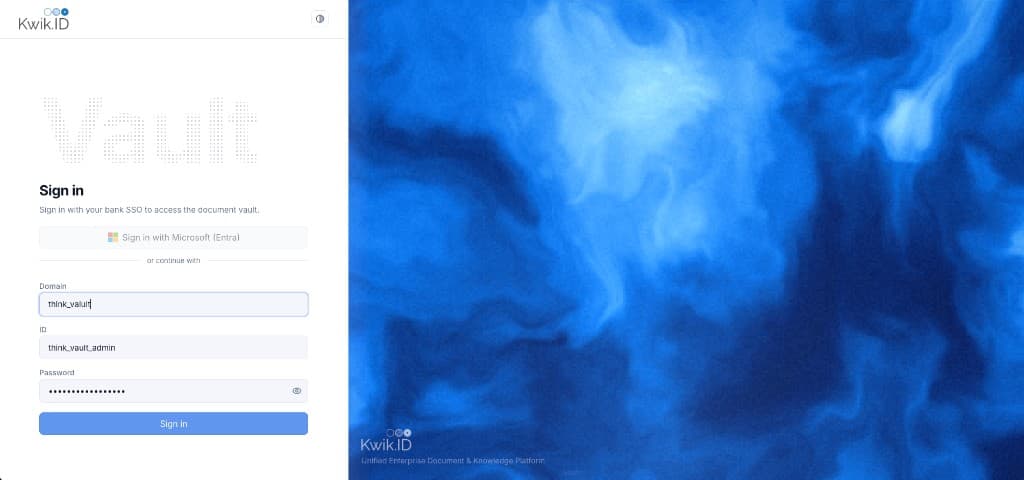
The Kwik Vault login page provides enterprise-grade authentication for bank staff. Users sign in with corporate SSO or, in non-production environments, with domain, ID, and password credentials.
Overview
Authentication integrates with the institution's enterprise identity provider for corporate single sign-on. Integrators and service accounts use separate API keys and service users (see API Keys).
Key Features
- Corporate SSO: One-click sign-in for bank employees using corporate credentials.
- Multi-tenant domain login: Domain, ID, and password fields for non-production and service-user portal access.
- Password visibility toggle: Show or hide password during credential entry.
- Theme control: Light and dark mode toggle in the header.
- Enterprise branding: Kwik.ID logo with tagline Unified Enterprise Document & Knowledge Platform.
Implementation
Step 1: Sign in with corporate SSO
- Open the Kwik Vault login page.
- Click the corporate SSO sign-in option.
- Complete authentication with your institution's identity provider.
- You are redirected to the portal after successful sign-in.
Step 2: Domain-based sign-in (non-production)
When corporate SSO is unavailable, use the domain, ID, and password form with credentials provisioned by your administrator.
| Field | Description |
|---|---|
| Domain | Organization domain assigned during setup |
| ID | User login identifier |
| Password | User password |
Step 3: Post-login routing
After successful authentication, users land on the Upload module. The top bar shows organization name, branch and department scope selectors, operational status, global search (Cmd + K), and the signed-in user profile.
Benefits
- Single sign-on: Bank staff use the same corporate login as other enterprise applications.
- Inherited security policy: Institution MFA and access policies apply to Kwik Vault.
- Separation of human and machine auth: Portal users via SSO; integrators via service users and bearer tokens.
Next Steps
- Upload: first action after sign-in
- Users: portal user onboarding
- API Keys: integrator credentials
- Architecture: identity and access model