 KwikID Documentation
Audit
Activity monitoring, filtering, and CSV export for compliance and examinations
Audit
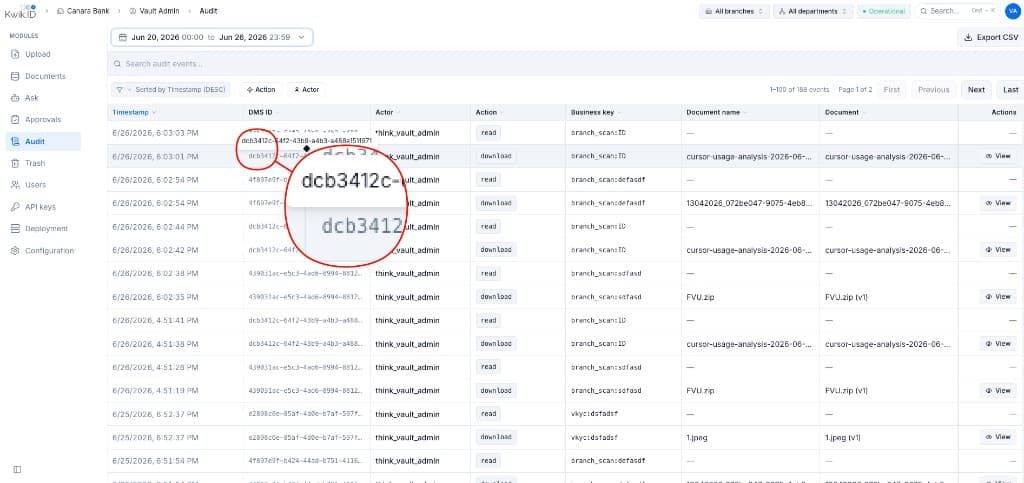
The Audit module records every read, write, approval, and download in an append-only log. Compliance officers and auditors filter events, inspect details, and export CSV for regulatory examinations.
Overview
Audit uses an append-only log with integrity verification linking entries. Immutable archive support is available for long-term regulatory retention requirements.
Key Features
- Comprehensive activity tracking: Logs
read,download,preview,approve,reject,ingest, and AI query actions. - Document traceability: Every entry links to DMS ID, Business Key, document name, and version.
- Actor identification: Username or service user ID for each action.
- Date range filter: Default window with preset and custom ranges.
- Action and actor filters: Narrow results by action type or specific users.
- CSV export: Download loaded audit data for external compliance reporting.
- Pagination: Navigate large event sets (e.g. 1–100 of 188 events).
- Event detail view: Click View to inspect granular audit entry details.
Implementation
Step 1: Filter audit events
- Open Audit from the sidebar.
- Set the date range (e.g. Jun 20–Jun 26, 2026).
- Use the search bar to find specific events.
- Apply Action and Actor filter chips.
- Sort by timestamp (default: descending).
Step 2: Inspect an event
- Scan columns: Timestamp, DMS ID, Actor, Action, Business key, Document name.
- Click View on a row to open the event detail panel.
- Cross-reference DMS ID with Documents for full metadata.
Step 3: Export for compliance
- Apply filters to scope the export to the examination period.
- Click Export CSV in the toolbar.
- Share the file with auditors or import into your GRC tooling.
Audit Table Columns
| Column | Description |
|---|---|
| Timestamp | Exact date and time of the event |
| DMS ID | Document UUID (copyable) |
| Actor | User or service account that performed the action |
| Action | Event type badge (read, download, etc.) |
| Business key | source_tag:external_id context |
| Document name | Filename with version tag |
| Actions | View detail button |
Benefits
- Chain of custody: Complete provable record for every document interaction.
- Tamper detection: Integrity verification makes retroactive log modification detectable.
- Examination readiness: One-click export expedites regulatory reviews.
Next Steps
- Documents: preview audit trail per document
- Integration APIs: audit export API endpoint
- Architecture: audit capability overview
- Introduction: back to Kwik Vault overview