 KwikID Documentation
Upload
Manual document ingest with metadata, file upload, and integration API examples
Upload
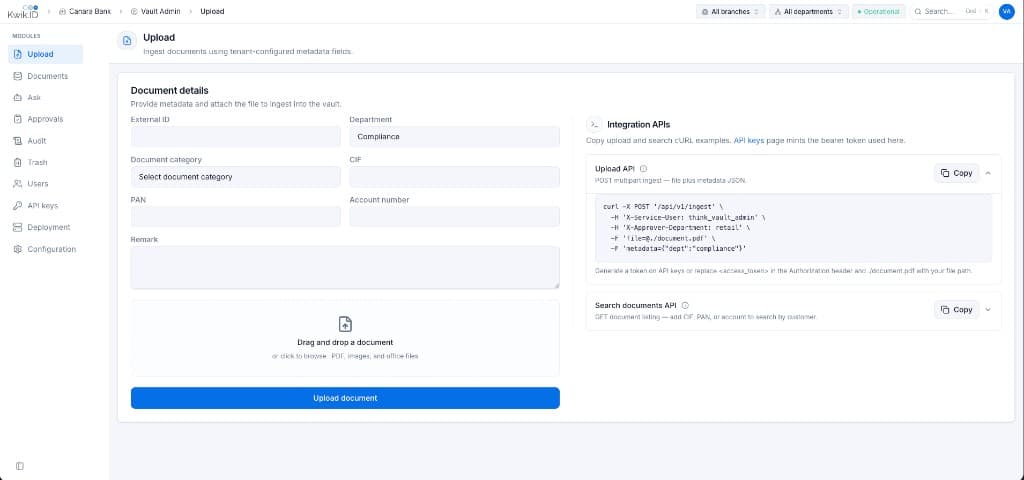
The Upload module is the entry point for manually ingesting documents into the vault. Provide metadata, attach a file, and submit, or copy ready-to-use cURL examples for programmatic integration.
Overview
Upload accepts documents from branch officers and operators who need to archive paper-origin or ad-hoc files into the same governed repository as system feeds from VKYC and Document Service.
Key Features
- Dynamic metadata form: Fields driven by tenant Metadata schema configuration (External ID, Department, Document category, CIF, PAN, Account number, Remark).
- Drag-and-drop file upload: Accept PDF, images, and office files with progress feedback.
- Ingest validation: File type and size limits enforced per tenant Ingest configuration.
- Integration APIs panel: Copy upload and search cURL examples; bearer token minted on the API keys page.
- Upload summary: Success card shows DMS ID, Business Key, version, and approval state after ingest.
Implementation
Step 1: Complete document metadata
- Open Upload from the sidebar.
- Fill required metadata fields:
- External ID: Stable identifier for the Business Key (paired with source tag
branch_scanfor manual uploads). - Department: Select from authorized departments (e.g. Compliance, Retail Banking).
- Document category: Select the document type (e.g.
kyc_vkyc). - CIF, PAN, Account number: Optional customer references for Tier 1 search.
- Remark: Free-text notes stored in version metadata.
- External ID: Stable identifier for the Business Key (paired with source tag
- Use branch and department scope selectors in the top bar to set upload context.
Step 2: Attach the file
- Drag and drop a document into the drop zone, or click to browse.
- Supported types depend on tenant ingest limits (default: PDF, images, Word, Excel, ZIP, plain text up to 50 MB each).
- Click Upload document to submit.
Step 3: Integrate via API
The Integration APIs panel provides cURL templates:
curl -X POST '/api/v1/ingest' \
  -H 'Authorization: Bearer <access_token>' \
  -H 'X-Approver-Department: retail' \
  -F 'file=@./document.pdf' \
-F 'metadata={"dept":"compliance"}'- Generate a bearer token on the API Keys page.
- Replace the placeholder file path and metadata JSON.
- For VKYC integrators, set
source_tagtovkyc; for Document Service, usedoc_service.
New versions start in pending approval state when API ingest approval is enabled in Configuration.
Benefits
- Unified ingest path: Manual uploads follow the same contract as automated system feeds.
- Self-service integration: cURL examples reduce time-to-integrate for development teams.
- Configurable validation: Admins control required customer refs and file type limits per tenant.
Next Steps
- Documents: browse ingested files
- Approvals: approve pending uploads
- Configuration: metadata schema and ingest rules
- Integration APIs: full ingest payload specification